


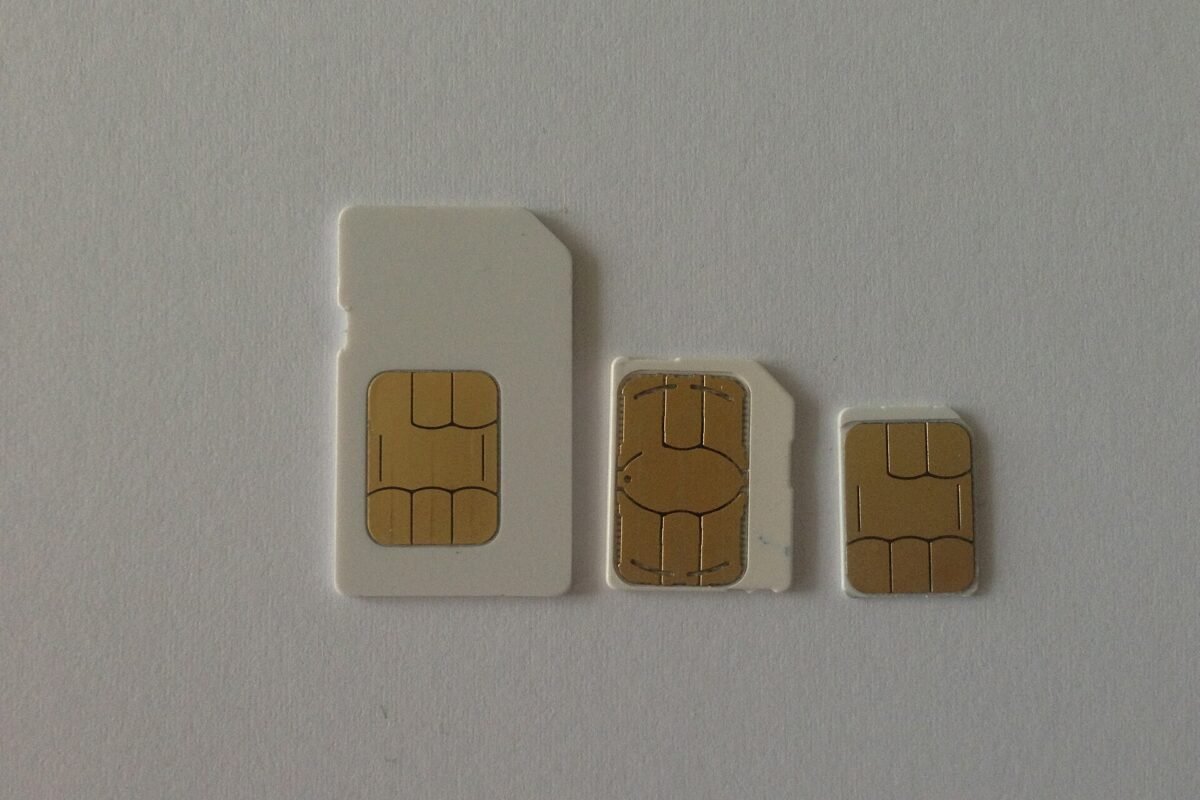
A SIM swap attack is when a criminal convinces or bribes your mobile carrier to move your phone number to a SIM card or eSIM they control. Once they have your number, they receive your texts and calls, including one-time login codes, and can reset passwords to your email, bank and crypto accounts. You can stop most attacks by turning on your carrier’s SIM and number-lock protections, setting a port-out PIN, and moving important accounts off SMS-based two-factor authentication.
The first sign is usually mundane: your phone suddenly shows “No Service” or “SOS only” while you’re at home with full Wi-Fi. You assume it’s a network glitch. Meanwhile, someone across the country is receiving your bank’s password reset code, logging into your email and draining a crypto account. By the time you reach your carrier, the damage can be done.
SIM swapping has been behind some of the most expensive individual thefts in crypto and a long list of hijacked social media accounts. The good news: carriers now offer free locks that block most attempts, and they take about ten minutes to set up.
Key takeaways
- Your phone number is often the master key to your accounts, because it receives password resets and SMS codes.
- Attackers use social engineering, stolen personal data or bribed insiders to move your number.
- Every major U.S. carrier offers free account locks and number transfer PINs. Turn them on.
- Switch high-value accounts to authenticator apps or passkeys instead of text-message codes.
- Sudden loss of service is a red flag. Contact your carrier immediately from another phone.
What is a SIM swap attack?
A SIM swap attack is a form of account takeover in which a fraudster transfers your mobile phone number to a device they control, letting them intercept calls and texts meant for you. A related scheme, port-out fraud, moves your number to an entirely different carrier. The result is the same: your number now rings on their phone.
Carriers swap SIMs legitimately all the time, when you lose a phone, upgrade or switch to eSIM. Attackers exploit that routine process.
How does a SIM swap attack happen?
- Reconnaissance. The attacker gathers your name, phone number, address, date of birth and sometimes the last four digits of your Social Security number, often from data breaches, social media or data brokers.
- Impersonation. They contact your carrier, by phone, online chat or in a store, pretending to be you. They may claim a lost phone or a broken SIM.
- Bypassing checks. With enough personal data, they answer security questions. In some cases, criminals have bribed or recruited carrier employees to do the swap directly.
- Activation. Your number moves to their SIM or eSIM. Your phone loses service.
- Account takeover. They trigger “forgot password” on your email, then on financial and crypto accounts, intercepting the codes sent by text.
Phishing often plays a role too. A fake text or call “from your carrier” may ask you to confirm a code, which is actually the authorization for the swap. Our guide to spotting phishing scams covers these tactics.
What are the warning signs of a SIM swap?
- Your phone suddenly shows no service or “SOS only” in an area where it normally works.
- You get a notification from your carrier about a SIM change or eSIM activation you didn’t request.
- You can’t log into email or other accounts, or you see password reset emails you didn’t trigger.
- Friends say they received odd messages from your number.
If you see these, act within minutes, not hours.
How do you prevent a SIM swap attack?
1. Turn on your carrier’s account and SIM locks
The three major U.S. carriers all offer free protections, found in their apps or account settings. AT&T has Wireless Account Lock; Verizon offers Number Lock and SIM protection; T-Mobile provides SIM Protection and related account takeover safeguards. Names and menus change, so search your carrier’s site for “SIM protection” or “number lock.” When enabled, these block SIM changes and number transfers until you unlock them yourself.
2. Set a strong account PIN and a port-out PIN
Your carrier account PIN should be unique, not your birth year or the last four of your SSN. Carriers also issue a separate number transfer PIN that’s required to port your number out. Don’t share it with anyone who contacts you.
3. Stop relying on SMS for two-factor authentication
Text-message codes are better than nothing but are exactly what SIM swappers target. Move your email, banking, brokerage and crypto accounts to an authenticator app, a hardware security key or passkeys. We compare options in the best two-factor authentication method.
4. Secure your email first
Your email account is the reset button for nearly everything else. Give it a unique password, a passkey or security key, and remove your phone number as a recovery option if the provider allows another secure method.
5. Reduce your exposed personal data
Limit what you share publicly, especially your phone number. Consider a separate Google Voice or similar number for public use. If your data has appeared in a breach, follow our checklist on what to do after a data breach, and consider freezing your credit.
What should you do if you’ve been SIM swapped?
- Call your carrier immediately from another phone or use Wi-Fi calling if available. Say you’re a victim of SIM swap fraud and ask them to restore your number and lock the account.
- Secure your email using another device. Change the password and sign out all sessions.
- Contact your banks, brokerages and crypto exchanges. Ask them to freeze or flag accounts and reverse unauthorized transactions where possible.
- Change passwords and 2FA on every important account, moving away from SMS.
- Report the crime to the FBI’s Internet Crime Complaint Center and file an identity theft report at IdentityTheft.gov.
- Document everything: times, call reference numbers and transaction details.
What are carriers required to do?
In late 2023, the FCC adopted rules requiring wireless carriers to use secure methods to authenticate customers before SIM changes or number transfers, notify customers of those requests, and give customers the option to lock their accounts. The rules were published in the Federal Register, but the FCC later waived the original compliance deadline pending additional federal review, so the timeline for full enforcement has been uncertain. Don’t wait for regulation; use the tools carriers already offer.
| Protection | Stops | Effort |
|---|---|---|
| Carrier SIM / number lock | Unauthorized SIM swaps and ports | 5 minutes in your carrier app |
| Unique account PIN and port-out PIN | Impersonation at the carrier | 5 minutes |
| Authenticator app, security key or passkey | Code interception even if the swap succeeds | 30–60 minutes across key accounts |
| Remove phone as email recovery | Email takeover via SMS reset | 10 minutes |
Our take: what this means for you
If you do one thing after reading this, open your carrier’s app and turn on SIM protection or number lock. It’s free, it’s fast, and it stops the most common version of this attack cold. Then spend an hour moving your email, bank and any crypto exchange accounts off SMS codes.
Anyone with meaningful crypto holdings, a large brokerage account or a public profile should treat this as urgent. SIM swappers target people who are visibly worth the effort. The uncomfortable truth is that your phone number was never designed to be a security credential, yet many services still treat it like one. Defend it accordingly, and make sure it’s not the only thing standing between a thief and your money.
Frequently asked questions
Can someone SIM swap you without your phone?
Yes. That’s the point of the attack. The criminal never touches your phone; they convince your carrier to move your number to their SIM or eSIM using your personal information or an inside contact.
Does eSIM prevent SIM swapping?
Not by itself. Attackers can request an eSIM transfer just as they would a physical SIM swap. What prevents it is your carrier’s account lock, strong PINs and moving accounts away from SMS authentication.
Will my bank reimburse me after a SIM swap?
For bank and card accounts, federal rules on unauthorized electronic transfers may limit your liability if you report quickly. Crypto losses are much harder to recover, since transactions are usually irreversible. Report immediately to improve your chances.
How do I know if my SIM has been swapped?
The clearest sign is sudden loss of cell service in a place where you normally have coverage, along with carrier notifications about SIM changes or unexpected password reset emails. Contact your carrier right away from another device.
Is SMS two-factor authentication still worth using?
It’s better than no second factor, but for important accounts an authenticator app, security key or passkey is much stronger. Use SMS only where nothing better is offered, and lock your carrier account to reduce the risk.


Community Insights
0 Comments